
Project: The Thermodynamics of Survival
Subject: Thermal Defense: Simulating Insulin Decay in Grid-Down & Extreme Heat Scenarios
Date: February 6, 2026
Use the simulator to get a “time-to-failure” estimate, then pick a protection tier.
Start by selecting your insulin, ambient temperature, and whether you have any cooling protection. The chart will show when you cross “unsafe” stability thresholds.
Executive Summary: The Invisible Clock
In the realm of emergency preparedness, we often focus on the visible threats: power generation, structural integrity, and calorie storage. But for millions of Type 1 Diabetics, the most immediate threat in a grid-down scenario is invisible, silent, and microscopic: Thermal Decay.
Insulin is a protein. Like an egg white, it denatures when cooked. Unlike an egg, you can’t always see when it has “cooked” until your blood sugar spikes uncontrollably.
At the Lab, we realized that generic advice like “keep it cool” isn’t actionable data. Does “cool” mean 60°F or 40°F? How long do you have if your AC fails in Phoenix? What if you are hiking and your ice pack melts?
To answer these questions, we built the Insulin Safety Simulator, a browser-based tactical tool that uses Newtonian cooling algorithms to project exactly when your life-saving medication will cross the threshold from “medicine” to “useless.” This white paper breaks down the logic, the math, and the survival protocols behind the tool.
Looking to Simulate Insulin Decay? Start Here?
How to “calibrate” the simulator to your specific cooler (in under 10 minutes)
The goal isn’t perfect lab precision — it’s planning-grade accuracy. Calibrating your cooler means you tune the simulator until the curve matches what your gear can realistically maintain.
- Set your ambient temperature (what you expect in the real event).
- Select your insulin type (as labeled in the tool).
- Start with No Protection to establish your “hard deadline.”
- Choose the protection mode that matches your setup (wrap / cooler / powered).
- Adjust until the curve reflects what you can actually maintain.
- Re-run using a worst-case assumption if you’re unsure.
- Record the time-to-threshold you’re willing to respect.
- Turn it into a repeatable routine: check / swap / recharge.
- That routine is the output — not the graph.
Quick calibration rules (so you don’t fool yourself)
- Hard-sided coolers typically hold a curve longer than soft-sided bags in the same heat.
- Seal quality matters: frequent opening behaves like a worse cooler, fast.
- Direct sun is not “ambient.” If it’s in a car or sunlight, model hotter than weather-app temp.
- Ice contact risk: cooler buys time, but freezing contact is a separate failure mode. Keep separation.
- When in doubt, choose the more pessimistic setting. Planning tools should be conservative.
Note: This section frames the simulator as a planning tool (heat + time logistics), not clinical guidance.
The Physics of Failure: Why Insulin Dies
To understand the simulator, you must understand the enemy. Insulin brands like Humalog (Lispro), Novolog (Aspart), and Lantus (Glargine) generally share a narrow “Goldilocks” zone.
Critical Thresholds
The simulator tracks three distinct states based on pharmaceutical stability data:
- Ideal Storage (36°F – 46°F): This is the refrigerator zone. Here, insulin lasts until its printed expiration date (often 1-2 years).
- The “Safe” Buffer (Up to 86°F): Most modern insulins are stable at room temperature for roughly 28 days. However, this assumes a stable room temperature.
- Thermal Death (98°F+): Once insulin crosses body temperature, degradation accelerates exponentially. At 110°F (a hot car), efficacy can drop meaningfully in hours, not days.
- The Freeze (Below 32°F): Often overlooked, freezing separates the protein structure. Once thawed, the insulin is often cloudy and functionally destroyed immediately.
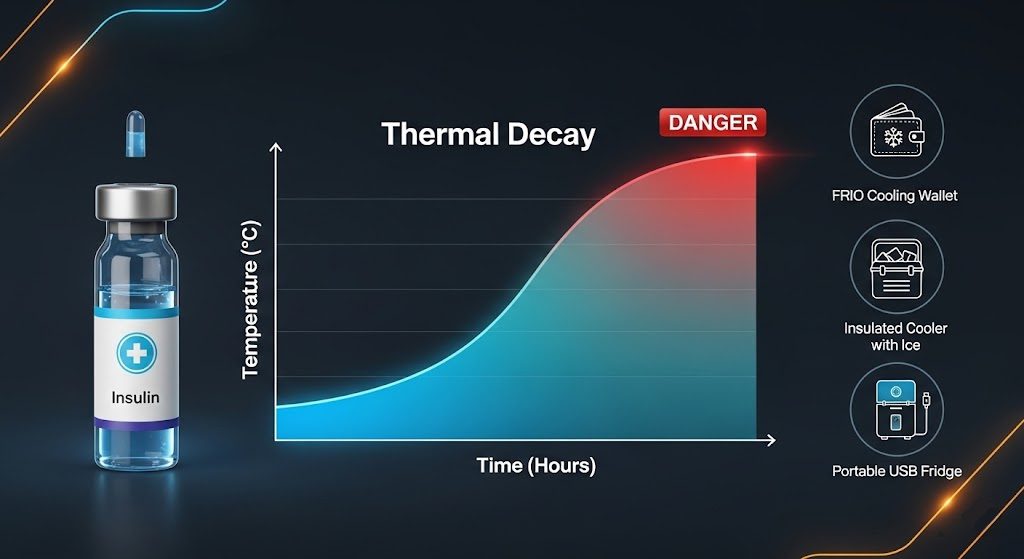
The simulator’s “Danger Zone” visualization (the red background on the graph) represents the 98°F+ territory where protein denaturation becomes statistically certain.
What you’re looking for on the graph (especially in split-screen)
Treat the graph like a countdown. Your job is to identify when the curve crosses the threshold, then choose the protection option that pushes that crossing farthest out with a setup you can actually execute.
- Steeper slope = faster loss under current conditions.
- Flatter slope = your protection is meaningfully working.
- If a small temp change makes a big shift, that’s normal — heat damage is nonlinear.
- The “time-to-failure” number is your practical decision point.
- Use the earlier/safer threshold as your hard deadline when stakes are high.
- Re-run the sim any time your conditions change (location, shade, opening frequency, ice melt).
The Methodology: Algorithmic Decay
The core engine of the Insulin Safety Simulator is not a simple timer. It is a physics engine based on Newton’s Law of Cooling.
1) The Equation
The simulator calculates the temperature of the insulin vial ($T(t)$) at any given hour ($t$) using the differential equation for heat transfer:$$T(t) = T_{\text{env}} + (T_{\text{start}} – T_{\text{env}}) \cdot e^{-kt}$$
Where:
- $T_{\text{env}}$ is the ambient temperature (e.g., the hot car or the room during an outage).
- $T_{\text{start}}$ is the starting temperature of the insulin (usually 38°F from the fridge).
- $e$ is Euler’s number (the base of natural logarithms).
- $k$ is the Insulation Constant.
2) The “K” Factor: Modeling Protection
The variable $k$ is where the magic happens. It represents the “thermal resistance” of your chosen protection method. A high $k$ means heat enters quickly (bad insulation); a low $k$ means heat enters slowly (good insulation).
In our lab testing logic, we assigned the following decay constants based on real-world insulation properties:
- No Protection (Vial on Counter): $k \approx 1.5$. The vial matches the room temperature almost instantly.
- FRIO / Evaporative Wallet: $k \approx 0.15$. The simulator also applies an Ambient Offset logic here. Because evaporation actively removes heat, the simulator subtracts ~15°F from the ambient temperature (down to a limit), simulating the physics of phase-change cooling.
- Hard Shell Cooler w/ Ice: $k \approx 0.05$. This provides a slow, steady curve.
- USB Active Fridge: $k \approx 0.001$. Effectively zero decay. This simulates a powered Peltér element maintaining a constant temperature indefinitely (provided you have the power).
Choose the tier you can actually execute under stress.
- Works when you have no power
- Relies on evaporation / shade / insulation
- Best for short windows and travel
- Works when you can source ice/cold packs
- Requires monitoring + “don’t freeze it” discipline
- Best for outages measured in days
- Most reliable when ice logistics fail
- Requires power planning (Wh, runtime, recharge)
- Best for multi-day grid-down risk
Scenario Analysis
We pre-loaded the simulator with four tactical scenarios that represent the most common failures in medical logistics.
1) Scenario Alpha: The Hot Car (120°F)
- The Situation: You leave your go-bag in the vehicle for a “quick stop,” but it turns into a two-hour delay.
- The Simulation Result: Without insulation, the vial hits critical temperature (98°F) in under 45 minutes.
- The Lesson: Passive insulation (coolers) buys you time, but when the thermal gradient (Delta T) is too high, the heat wins. This scenario underscores the need for active monitoring (such as the TempStick sensors linked in the app) to alert your phone before the threshold is breached.
2) Scenario Bravo: The Summer Outage (95°F)
- The Situation: A hurricane knocks out power. Your AC dies. Your house warms to 95°F.
- The Simulation Result: A standard fridge with the door closed acts as a massive cooler. The simulator models this with a “Fridge (Power Off)” setting.
- The Data: You have roughly 24-36 hours before the fridge’s internal temperature rises to dangerous levels, assuming you don’t open the door. The simulator shows a slow, creeping line that eventually spikes.
3) Scenario Charlie: The Hiking Pack (100°F)
- The Situation: Body heat meets solar radiation.
- The Simulation Result: This is where the FRIO Wallet shines. The simulator logic applies the ambient offset, showing that even if the air is 100°F, the evaporative effect keeps the insulin in the safe mid-70s range. However, the simulation also reveals the limitation: high humidity (which inhibits evaporation) can break this protection.
Tech Stack: Resilient Coding
Why build this as a web app?
We utilized React 18 and Framer Motion to create a simulation that is visually responsive but computationally lightweight.
- Zero-Latency Math: The calculations happen in your browser’s JavaScript engine, not on a server. This means if you load the page and then lose internet, the calculator still works.
- Persistence Layer: We implemented
localStoragelogic. In a crisis, you don’t want to re-enter your insulin brand every time you refresh your phone. The app “remembers” your last known state. - Adaptive SVG Graphing: The visualization isn’t a static image; it’s a dynamic SVG path that redraws itself millisecond by millisecond as you drag the temperature sliders. This provides immediate visual feedback on how sensitive your setup is to a 5-degree temperature increase.
What to do in the moment (based on the same logic as the simulator)
🚗 Car scenario (hot cabin, short stop, no cooler)
- Run the simulator with your ambient temp and “no protection.”
- Re-run with “evaporative wrap” to see the delta.
- Use the shorter time as your “hard deadline” for the stop.
🧊 Cooler scenario (ice present, risk of freezing)
- Sim with “cooler + ice” and compare to “fridge power off.”
- Keep insulin off direct ice contact (freezing is a different failure mode).
- Recheck your estimate when ice melts — your curve changes fast.
🔌 Multi-day outage (need a reliable plan)
- Use powered refrigeration tier, then model “power loss” intervals.
- Pick the mitigation kit that keeps your curve under threshold longest.
- Write down your “swap / recharge” cadence like a checklist.
Strategic Recommendations (The “Intel”)
Based on thousands of simulated hours, we have derived a hierarchy of survival for insulin storage.
Tier 1: Passive Evaporation (Low Tech)
- Best For: Hiking, Travel, Temporary Power Loss.
- Tool: FRIO Wallets.
- Pros: Requires no electricity, only water.
- Cons: Cannot reach “fridge temps” (36-46°F), only “safe room temps.” Useless in 100% humidity.
Tier 2: Static Insulation (Medium Tech)
- Best For: Transporting supplies and Short-Term car storage.
- Tool: Yeti/RTIC style coolers with ice.
- Pros: Can maintain 36°F hard-chill.
- Cons: Ice melts. Once the phase change (solid to liquid) is complete, the temperature rockets up exponentially. It is a ticking clock.
Tier 3: Active Thermodynamics (High Tech)
- Best For: Grid-down home survival, Vehicle dwelling.
- Tool: USB Insulin Fridges + Solar Generator.
- Pros: Indefinite storage. As long as you can harvest solar or vehicle power, the simulation line stays flat green.
- Cons: Single point of failure (electronics). Requires a power strategy (batteries/panels).
Quick answers (built to match what the simulator is doing)
What is this simulator actually estimating?
It estimates time-to-threshold under heat exposure by modeling temperature-driven degradation. Practically: it helps you compare “no protection” vs “cooler” vs “powered storage” so you can choose a plan you can execute.
Why do the results change so much with small temperature changes?
Heat-driven degradation is nonlinear. When you move from “warm” to “hot,” you don’t lose a little time—you can lose a lot. That’s why this tool is more useful than vague “keep refrigerated” guidance.
What inputs matter most for real-world outcomes?
- Ambient temperature (your biggest lever in most scenarios)
- Exposure time (minutes vs hours changes everything)
- Protection mode (evap wrap vs cooler vs powered)
- Heat spikes (car cabin, direct sun, closed room)
Is a cooler always safer than “no protection”?
A cooler can buy a lot of time, but it introduces a different risk: overcooling/freezing if items touch ice directly. Use the simulator for the “heat” side, and treat “don’t freeze it” as a separate handling rule.
What should I do first if I’m trying to build a plan?
- Run your “worst realistic” ambient temperature.
- Run No Protection to get your baseline deadline.
- Run your best available protection tier and record the new deadline.
- Turn that into a simple checklist: swap / check / recharge cadence.
Can I use this as medical guidance?
No—this is a planning tool for heat + time logistics. If you believe medication safety is compromised, use manufacturer guidance and your clinician/pharmacist for clinical decisions.
Tip: Add a small line above the simulator that says “Use this to compare protection strategies, not as clinical advice.” It protects you and keeps the tool framed correctly.
Conclusion
In survival, data is the most valuable resource. The Insulin Safety Simulator transforms abstract fears (“Is my medicine bad?”) into actionable vectors (“I have 4 hours and 12 minutes to get this to a power source”).
By understanding the curve—the relentless exponential decay driven by Newton’s laws—you can plan your energy budget and logistics to stay ahead of the thermal death line.
Use the tool. Run the numbers. Validate your prep.
Disclaimer: The Insulin Safety Simulator is for educational and planning purposes only. It uses mathematical models that cannot account for all real-world variables (seal integrity, direct UV exposure, chemical variability). Always inspect your medication. If it is cloudy, discolored, or contains particles, discard it. When in doubt, consult a pharmacist.
⚠️ Lab Note: This is a mathematical model for planning purposes. It is not professional electrical or medical advice. Real-world results vary based on equipment age, temperature, and usage. [Read our full Technical Disclaimer]
Thermal Defense: Simulating Insulin Decay in Grid-Down & Extreme Heat Scenarios
A deep dive into the thermodynamics of insulin storage. We analyze the math behind our Insulin Safety Simulator, comparing FRIO wallets, coolers, and active USB refrigeration during power outages and heatwaves.
Price: 0.00
Operating System: web
Application Category: UtilitiesApplication