
Project: StarlinkSizer Engine (v1.2)
Subject: Off-Grid Load Profiling & System Sizing for Starlink
Date: December 19, 2025
Home Power Lab • Lab-Grade Reality Checks
StarlinkSizer: Solar Sizing Tool & Winter Consumption Guide
Starlink changed the game for remote work. Suddenly, you could Zoom from a van in Baja or a cabin in the Rockies with gigabit-speed low low-latency. But unlike a 5W LTE hotspot, a Starlink dish is a phased-array radar station that consumes serious power.
The internet is full of “one 100W panel is enough” advice. This advice works great in July. It fails catastrophically in December.
We built StarlinkSizer to kill the optimism bias. It takes your specific hardware (Standard, High Perf, or Mini), your location, and your usage habits, and runs them through a physics-based simulation to see if your battery will actually survive the night.
This Tool Shows You
- Real-World Draw: Why the “Average Watts” on the box doesn’t account for heaters, boot surges, or inverter losses.
- The Inverter Tax: How powering your dish via an AC outlet wastes 15–20% of your total energy budget.
- The Winter Crash: Why a system that works in summer might fail by 2 PM in winter.
- The “Boot Tax”: Why turning your dish off and on might cost more energy than you think.
📡 Phase 1: Run the Calculator. Input your dish type and battery size below to see if your setup survives a 48-hour simulation. Then, scroll down to read the engineering logic behind the numbers.
The 4 Physics Checks That Break Off-Grid Internet
Most people size their solar setup based on “average daily sun” and “average dish watts.” This “Reddit Math” ignores the edge cases that actually cause blackouts. Here is the engineering logic running under the hood of StarlinkSizer.
The “Snow Melt” Surprise (Heater Physics)
Starlink dishes have internal heating elements to melt snow and ice. They are automatic. You might think you have a 50W load, but if the ambient temperature drops and the dish detects obstruction, that draw can spike to 90W–150W depending on the model.
The Reality: In freezing temps, “Snow Melt” mode can double your daily consumption. A 100Ah battery that usually lasts 2 days might die in 12 hours.
The Inverter Tax (AC vs. DC)
The Standard (Gen 3) Starlink comes with an AC power supply. To run it off a battery, most people plug it into an inverter (like on a Jackery or EcoFlow). Inverters utilize energy to run themselves (idle consumption) and lose energy as heat during conversion.
DC Path: Battery (12V) → DC Boost Converter (57V) → Dish. Efficiency: ~92–95%.
The Engine: When you toggle “DC Conversion Mod,” the engine removes the inverter inefficiency penalty. You immediately see runtime extend.
The “Boot Tax” (Intermittent Usage)
“I’ll just turn it off when I’m not using it.” This is a classic power-saving strategy, but Starlink is a computer. It has a boot sequence. When a Starlink dish boots up, it scans the sky, downloads schedule data, and negotiates with satellites. This creates a power surge (up to 150W for Standard, 200W+ for High Perf) that lasts for several minutes before settling into “idle.”
The Lesson: If you turn the dish off for only 15 minutes, you might lose energy compared to leaving it idle because of the high-draw boot sequence.
Cold Battery Derating
Batteries are chemical reactions. Chemical reactions slow down in the cold. A Lithium Iron Phosphate (LiFePO4) battery rated for 1000Wh at 70°F (20°C) does not hold 1000Wh at 20°F (-6°C).
The Reality: Winter is the ultimate stress test: solar yield drops (short days), dish usage rises (heater), and battery capacity shrinks (cold chemistry).
“Reddit Math” vs. Reality: A Comparison
Here is the gap between the napkin math you see on forums and the physics-based modeling used in StarlinkSizer.
| Parameter | Reddit / Napkin Math | StarlinkSizer Reality |
|---|---|---|
| Dish Draw | “It uses 50 Watts.” | 50W Average + Heater Spikes + Boot Surges. |
| Battery Sizing | 1000Wh Battery / 50W = 20 Hours. | (1000Wh × 0.9 DoD × 0.8 Cold Factor) / (50W / 0.85 Inverter Eff) = ~12 Hours. |
| Solar Input | “I have a 100W panel.” | 100W Panel × 0.7 Real World × 3 Winter Sun Hours = ~210Wh/day. |
| Runtime | “Infinite with solar.” | “Counts down to zero” if daily yield < daily load. |
Under The Hood: The Simulation Engine
We didn’t just write a calculator; we wrote a time-series simulation.
When you adjust the sliders, the app runs a 48-hour loop representing two full days of usage.
- Hour 0-24: It subtracts your load hour-by-hour and adds solar yield only during “sun hours” (with a bell-shaped intensity curve).
- The Critical Test: It checks the battery state at 4 AM. This is the “Valley of Death” for off-grid systems.
- Visuals: The “Stress Vis” graph explicitly shows whether your battery reaches 0% at any point in the timeline.
If the line touches the bottom, your system failed—even if your “daily average” looked fine. You survived the day, but you didn’t survive the night.
The Verdict
StarlinkSizer isn’t designed to sell you more batteries. It is designed to save you from buying the wrong battery. By simulating the “Physics of Disappointment”—cold weather, heaters, and conversion losses—we give you a number you can actually trust when you are 50 miles from the nearest power outlet.
Frequently Asked Questions
Most calculators divide battery capacity by an average load and stop there. Real systems fail during spikes: inverter startup, heater activation, boot cycles, or cold derating.
The HPL tools model load hour-by-hour, not as a single static number. If your system hits zero at any point in the timeline — even briefly — it fails, regardless of what the daily average says.
• Shorter days: Less total solar input
• Lower sun angle: Reduced panel efficiency
• Cold chemistry: Battery capacity shrinks in low temperatures
At the same time, loads often increase (heaters, snow melt, longer usage). The tools intentionally stress-test winter because if a system survives January, it survives the rest of the year.
It’s the point when:
• Solar has been absent the longest
• Overnight loads have accumulated
• Batteries are coldest
If your system survives until sunrise with margin remaining, it will recover. If it fails before then, no amount of midday sun saves you.
Frequent on/off cycles trigger boot surges, heater checks, and reconnection logic. The tools apply a “boot tax” when intermittent usage is selected to reflect this hidden energy cost.
The tools calculate required capacity, runtime margin, and failure modes. Once you know those numbers, product choice becomes obvious — and you avoid buying hardware that fails silently in edge conditions.
In the real world, this often looks like:
• Inverter shutdown
• Router reboot loop
• Dish disconnect during the night
• Frozen battery protection lockout
The tools are conservative by design — they fail systems before real-world damage or outages occur.
Starlink Power Calculator: Solar Sizing Tool & Winter Consumption Guide
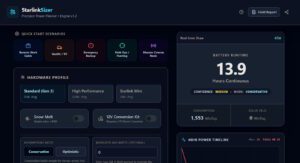
This is a SoftwareApplication that calculates PowerConsumption.
Price: 0.00
Operating System: web
Application Category: UtilitiesApplication