
Project: PoE Voltage Drop Calculator – The Physics of PoE Failure in Long-Run Camera Deployments
Subject: Analysis of Voltage Drop, Inrush Current, and Material Resistance in IP Camera Deployments
Date: February 25, 2026
Lab Brief (What this tool is actually doing)
What it answers
- Will this PoE camera stay online on a long run—especially at night?
- Where is the failure point: voltage drop, cable material, or load spike?
- What’s the cleanest fix: copper, injector boost, or extender?
Inputs you need
- Cable run length (ft or m)
- Camera power draw (W) and night IR behavior
- Cable type (pure copper vs CCA) + gauge
- Ambient temperature (attic/plenum/outdoor)
What you get
- Pass / Yellow / Red deployment verdict
- Max safe distance estimate
- Efficiency / loss visibility
- Printable report you can attach to a quote
Use it in 3 steps (fastest path to a correct verdict)
- Enter run length + cable type (pure copper vs CCA). If you don’t know, assume the worst (CCA) until proven otherwise.
- Set the camera load realistically: use max wattage and treat night mode as a spike condition, not “same as daytime.”
- Read the verdict: Pass = deployable, Yellow = works until night/temperature pushes it over, Red = redesign required (copper/boost/extender).
Installer Field Checklist (prevents the “works in the day, dies at night” callback)
- Confirm cable material (pure copper vs CCA) — don’t trust jacket marketing.
- Confirm gauge (23/24 AWG typical) and run path temperature (attic/plenum).
- Identify injector/switch PoE standard and real watt budget per port.
- Force night mode / IR LEDs and watch current draw for 2–3 minutes.
- Check voltage at the far end if you can (or confirm stable link + no reboots).
- If you’re in “Yellow,” fix it now—don’t wait for the first cold night.
In This Report
Abstract
The deployment of IP security cameras over long-distance Ethernet runs presents a unique set of electrical challenges often ignored by standard “Rule of Thumb” installation practices. A significant percentage of field failures—specifically the “Night Vision Reboot Loop”—are misdiagnosed as faulty camera hardware when, in fact, they are failures of the transmission medium.
This report details the engineering logic behind the HomePowerLab PoE Long-Run Validator, a physics-based simulation engine that predicts failure points by modeling Copper Clad Aluminum (CCA) resistance, thermal derating, and constant-power load dynamics.
The Problem: The “Phantom” Night Failure
Integrators frequently encounter a baffling scenario: A security camera is installed, tested at 2:00 PM, and marked “Operational.” However, the customer reports that the camera goes offline every night at 8:00 PM, then comes back online the next morning.
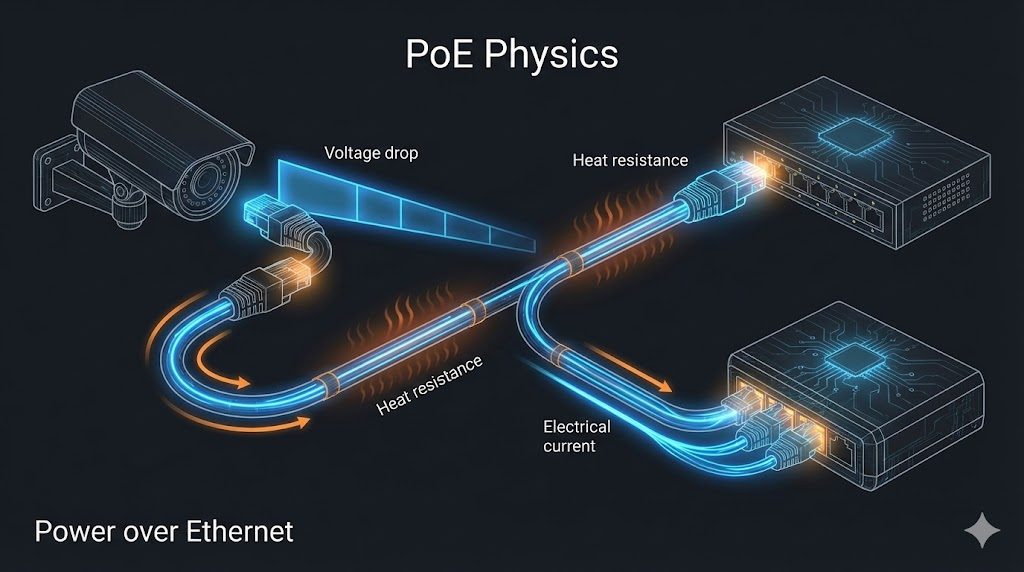
The Mechanism of Failure
Modern IP cameras are Constant Power Loads. Unlike a simple resistor (where current drops as voltage drops), a camera’s DC-DC converter demands a fixed wattage.$$P = V \times I$$
If the voltage ($V$) at the camera drops due to cable resistance, the camera must draw more current ($I$) to maintain its required power ($P$). This increase in current causes a further voltage drop across the cable ($V_{drop} = I \times R$), creating a feedback loop or “Voltage Death Spiral.”
The Night Vision Spike
The critical failure point occurs when the camera activates its Infrared (IR) illuminators and mechanical IR cut filter. This event typically increases power consumption by 25% to 40% in milliseconds. On a marginal cable run, this transient spike pushes the voltage below the camera’s Undervoltage Lockout (UVLO) threshold (typically ~37V for 802.3af devices), triggering a reboot. The camera restarts, the IR turns off, voltage recovers, and the cycle repeats.
Standards & Modeling Assumptions (what this validator assumes)
This tool models long-run PoE behavior using real-world failure drivers: conductor resistance, distance-based voltage drop, temperature derating, and load spikes (night IR). Results are intended for deployment screening and redesign decisions.
- PoE baseline: IEEE 802.3af/at/bt class constraints and typical injector behavior.
- Cable physics: resistance increases with length and temperature; CCA is penalized vs pure copper.
- Night mode: treated as a step-change load condition that can push marginal runs past dropout thresholds.
Methodology: The Physics Engine Logic
The HomePowerLab Validator does not use simple lookup tables. It employs a dynamic physics engine to simulate the electrical characteristics of the specific run.
Material Resistance Modeling (The CCA Penalty)
The single largest variable in PoE failure is the use of CCA (Copper Clad Aluminum) cable. While cheaper, aluminum has approximately 65% higher DC resistance than International Annealed Copper Standard (IACS).
The tool calculates base loop resistance ($R_{loop}$) using the following material multipliers:
- Solid Copper (24 AWG): $\approx 0.188 \, \Omega/m$ (Loop)
- CCA (24 AWG): $\approx 0.310 \, \Omega/m$ (Loop)
Thermal Derating
Resistance is temperature-dependent. Cables running through non-climate-controlled spaces (attics, outdoor conduit) experience increased resistance. The tool applies a temperature coefficient ($\alpha$) for copper/aluminum of $\approx 0.00393$ per degree Celsius.$$R_{final} = R_{base} \times [1 + \alpha(T_{ambient} – 20^{\circ}C)]$$
Example: A run that passes at room temperature ($20^{\circ}C$) may fail in an attic at $50^{\circ}C$ ($122^{\circ}F$) because resistance increases by roughly 12%, pushing the voltage drop into the critical zone.
The Quadratic Voltage Solution
To accurately predict if a Constant Power device will crash, the tool solves the quadratic equation derived from Kirchhoff’s voltage law for the circuit:
- $V_{source} = V_{load} + I_{load}R_{cable}$
- Substitute $I_{load} = \frac{P_{load}}{V_{load}}$
- $V_{load}^2 – V_{source}V_{load} + P_{load}R_{cable} = 0$
The tool calculates the discriminant ($\Delta = b^2 – 4ac$). If $\Delta < 0$, a Voltage Collapse is mathematically guaranteed (no real solution exists), meaning the cable simply cannot deliver the required wattage regardless of the source voltage.
Analysis of Failure Modes
The Validator categorizes results into three distinct engineering states based on IEEE 802.3 standards.
“Green” (Certified Pass)
- Voltage: $> 42.5V$ (802.3at) or $> 37V$ (802.3af) at the load.
- Data Integrity: Length $< 100m$ ($328ft$).
- Spike Test: Voltage remains stable even during the simulated +25% Inrush event.
“Yellow” (Marginal / Stability Risk)
This is the most valuable insight the tool provides. It flags runs where the steady-state (Daytime) operation is valid, but the Inrush Check indicates a dip below the safe threshold.
- Recommendation: This status suggests the system is likely to experience random reboots or packet loss. It is a “Deploy at your own risk” scenario.
“Red” (Critical Failure)
- Voltage Collapse: The resistance is so high that the power supply cannot drive the load.
- Data Limit: The run exceeds 100m, leading to signal timing errors (propagation delay) even when power delivery is sufficient.
Remediation Strategies (Smart Fixes)
When a run fails, the tool’s “Smart Fix Engine” runs background simulations on three alternative scenarios to find the most cost-effective solution.
Strategy A: The Voltage Boost (High-Power Injector)
Scenario: A 300ft run using Cat5e drops voltage to 36V (Fail) using a standard 48V switch. Fix: Swapping the source to a 56V PoE+ Injector increases the source pressure. The tool re-simulates the run at 56V. If the result at the camera is $>37V$, this is recommended as the “Easiest Fix” (No rewiring required).
Strategy B: Material Upgrade (The Copper Swap)
Scenario: A 250ft run using CCA fails due to high resistance ($~45\Omega$). Fix: The tool simulates the exact same length using Pure Copper specs. If this drops resistance to $~28\Omega$ and passes voltage checks, it is recommended as the “Best Quality Fix.”
Strategy C: The Extender
If the run exceeds the physics of DC transmission or Ethernet timing (100m), the only solution is active regeneration. The tool flags this as “Physics Limit Reached.”
FAQ: Long-Run PoE Camera Failures
Why do cameras fail at night but look “fine” during the day?
Night mode often adds IR LEDs and changes ISP behavior, which increases draw. On a marginal run, that extra current increases voltage drop, and the camera’s DC-DC converter can fall below its stable operating threshold—causing reboot loops or link drops.
Is CCA cable really that risky for PoE?
CCA can work on short runs, but long runs amplify its higher resistance. That means more voltage drop and more heat. In “Yellow” scenarios, switching from CCA to pure copper is often the cleanest, permanent fix.
What’s better: stronger injector, thicker cable, or a PoE extender?
Best permanent fix: pure copper with appropriate gauge.
Best when cable is already in place: PoE extender/repeater mid-run.
Best when you’re close to passing: higher-quality injector/switch port (real watt budget) — but don’t use “more power” to mask bad cable on extreme runs.
What should I do if I land in “Yellow”?
Treat Yellow as “will become Red under real conditions.” Fix it during install: reduce run length, move the switch closer, upgrade to pure copper, or add an extender. Yellow is where callbacks are born.
Does temperature really matter that much?
Yes—especially in attics, plenums, and exterior conduit. Conductor resistance rises with temperature, which increases voltage drop exactly when devices can also draw more (night behavior, heaters in housings, etc.).
Conclusion
The reliability of a PoE security system is deterministic, not random. The “random” reboots plaguing the industry are calculable outcomes of Ohm’s Law and Thermal Dynamics.
By validating cable runs against Temperature, Material Quality, and Transient Loads before termination, integrators can eliminate return visits and guarantee uptime. The HomePowerLab PoE Validator serves as the first line of defense against the physics of long-wire transmission.
Key Takeaway: Never guess on a run over 150 feet. Calculate the heat, check the material, and simulate the night.
Keywords: PoE voltage drop calculator, CCA vs. solid-copper Ethernet, security camera reboot loop, PoE inrush current, Cat6 resistance per meter, 802.3af vs. 802.3at distance limits, voltage drop simulation.
More HomePowerLab tools
If you’re designing a full system, these pair well with the PoE validator:
The Physics of PoE Failure: Long-Run Camera Validator
Discover the engineering physics behind PoE security camera failures. Learn how voltage drop, CCA cable, and night vision inrush current cause the reboot loop.
Price: 0.00
Operating System: web
Application Category: UtilitiesApplication